Gene Ontology Data
How do I find the GO annotations for my set of genes?
This assumes that you have successfully uploaded or created your set of genes. If you require help with this please see Lists
To find the GO term annotations for your genes it is easiest to start with a specially created template search:
- From the FlyMine homepage, select the ‘Templates’ tab from the navigation bar.
- From the list of templates we are looking for one called Gene → GO terms. If you cannot see it immediately enter ‘GO’ into the filter box to narrow the search.
- Click on the template name, this will display the template form. Enter the gene or select the list you wish to run the search with and press ‘Show results’.
Modifications:
This template search returns GO term annotations for all three GO ontologies along with other GO attributes, such as evidence code and qualifier. You may wish to further filter your results on some of these attributes, or add additional attributes to the search, such as annotation extension or the GO ‘with’ attribute. The following examples illustrate how to do this:
How do I filter my results to show only GO annotations from the ‘biological process’ ontology?
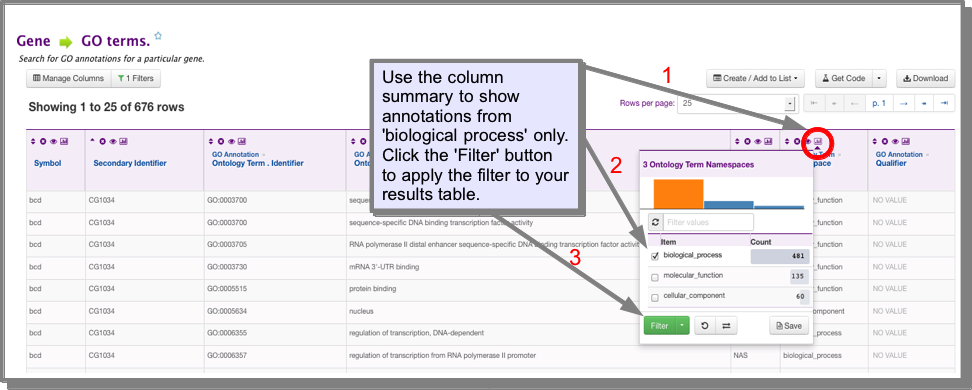
The easiest way to filter your results is using the filter functions in the results table. In the ontology term.Namespace column click on the column summary icon. Select ‘biological process’ and click filter. To return to your original results either remove the filter by clicking on the green ‘filter’ icon in this column header, or use the UNDO button above the results table:
How do I filter my results to remove those with the IEA evidence code?
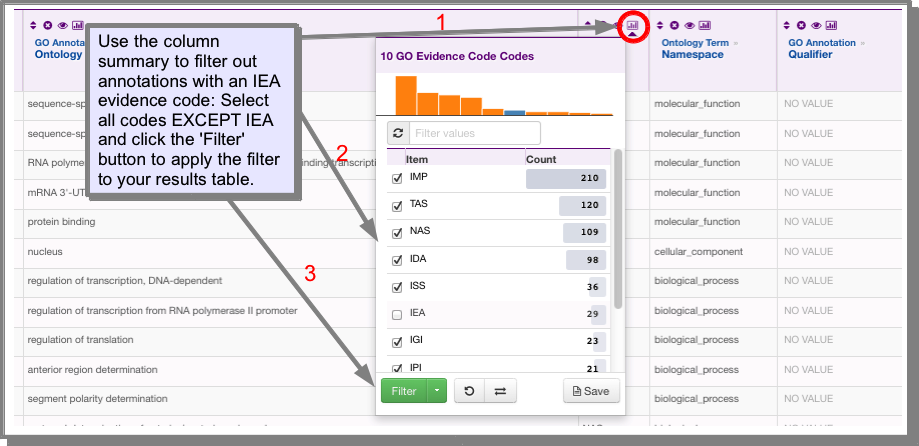
IEA is the inferred from electronic annotation evidence code, which you may wish to filter out to leave only high-quality annotations. You can do this either through the column summary or the filter’ function:
- Using the column summary:
Click on the column summary icon in the code column. Select all evidence codes except IEA and click filter.
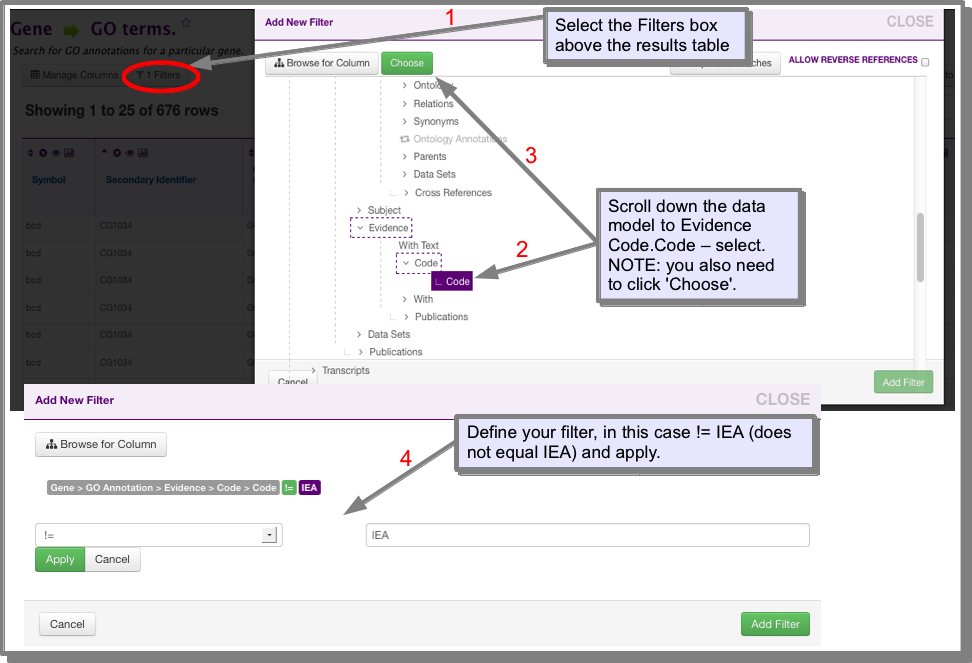
- Using the filter button:
Click on ‘Filters’ above the results table. Scroll down to the GO Evidence Code field and click ‘Choose’. Define your filter and click ‘Add filter:
How do I analyse my gene list for GO term enrichment?
Go term enrichment is calculated automatically for all gene lists - you simply have to navigate to the listanlaysispage for your list. The GO term enrichment for your list will be displayed as a widget (see What is a widget?). For more information on the enrichment calculation see the InterMine documentation.
Other Gene Ontology searches
FlyMine includes many other Gene Ontology related searches. To see the full range of searches navigate to the Template Searches page and enter ‘GO’ into the filter box (see Finding the template search that you want). For example you can find all genes annotated to a particular GO term using the GOterm → Genes template. This search is extended by the template GO term name [and children of this term] → Genes in one specific organism, which will return genes annotated to the term given AND genes annotated to any children of this term. Various combinations of GO term and data searching are available, for example Gene → orthologues and GO terms of these orthologues, will return the GO terms annotated to the orthologues of your gene(s). Remember, if you don’t see what you are looking for please Contact Us - we can probably construct the search for you.